Jobs & schedules
See assigned work and the day ahead, with the information your team needs alongside the job.
 BOOTTRADE HUB
BUILT AROUND THE WORKDAY
Support for the whole business. Win the work, support your crew and turn completed jobs into social content.
BOOT is being built around the way trade businesses work: planning jobs and travel, supporting your crew, keeping paperwork organised and helping you stay on top of customers, quotes and the work ahead.
Talk to BOOT ↗Take a look inside ↓In development · Preparing for controlled testing
BOOT Trade Hub is operated by IF THE BOOT FITS PTY LTD · Queensland, Australia
ONE BOOT
FITS ALL.
FROM THE OFFICE TO THE JOB SITE
For sole traders, growing crews and the office staff keeping everything moving.
See assigned work and the day ahead, with the information your team needs alongside the job.
Keep progress updates and job photos with the relevant work, so the office and crew can find the context.
Bring routine job records into the working day. Your business remains responsible for its safety obligations.
Keep work time records together for office review, with less chasing at the end of the week.
Keep enquiries and customer history connected, prepare quotes and see which conversations need another look.
Keep equipment allocations, pre-start checks and maintenance records connected to your crew and work, with due dates visible for review.
Give employees access to assigned work, job information, shift records and shared documents through their employer’s invitation.
Build on the job information you already have, prepare invoices and keep important decisions with authorised staff.
A LOOK INSIDE BOOT
These sharp, representative screens illustrate BOOT’s development interface using fictional sample information. They are not live records; details may change before release.
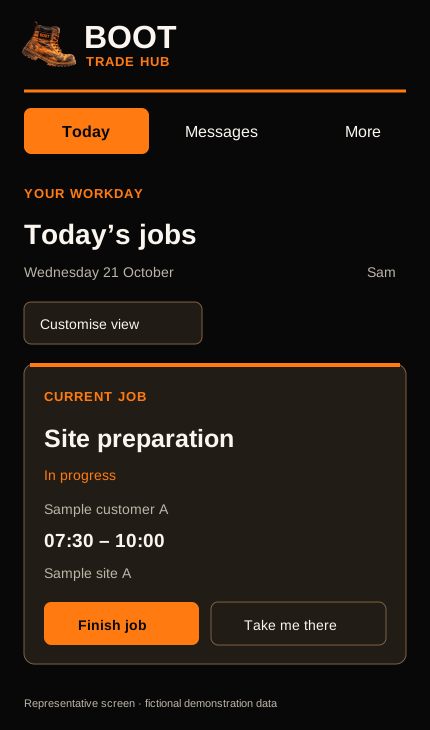
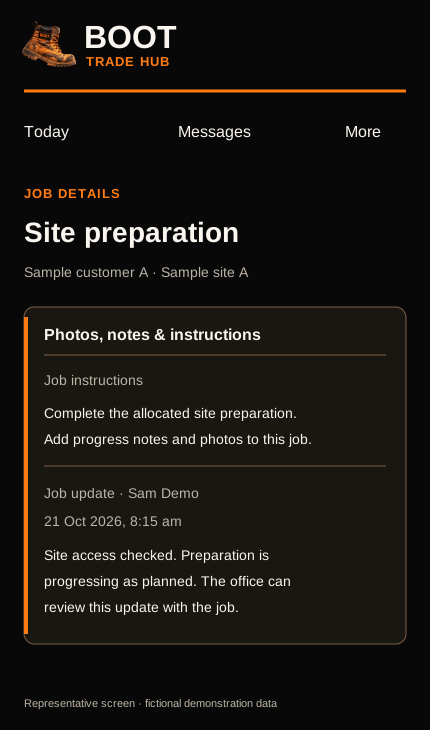
PLAN THE RUN. SEE THE WHOLE DAY.
An economical day starts before the first job.
Plan jobs and travel together, including the run from your depot and the return trip. Give each crew a clearer picture of the day, with room for job time, travel, breaks and the unexpected.
Set daily work targets around your business—including an adjustable 38-hour week—and see when the planned day runs over.
Current route planning uses travel estimates and job order entered or reviewed by the business. Planned improvements aim to consider traffic at departure time, school-zone hours where reliable data is available, and alternative roads suitable for the vehicle. Traffic-aware suggestions, school-zone handling and vehicle-restriction checks are not yet verified or available. Travel times and savings are not guaranteed.
THE DETAILS THAT KEEP A BUSINESS MOVING
The job is one part of the day. There’s also the paperwork to prepare, the records to keep current and the next customer to reach. BOOT is being built to bring those pieces together.
Keep the work, the hazards and the crew’s acknowledgements connected.
Less hunting for the right document before the job starts.
Give important business paperwork a proper home.
A clearer view of the records your business needs to keep current.
Turn selected job photos and public work details into a starting point for your next social post.
Start with the work you’ve already done, instead of a blank caption.
Win the work. Plan the day. Support the crew.
Keep the records. Grow your business.
These features form part of BOOT’s development interface and are being prepared for controlled testing. Availability may vary by role and configured service. AI drafts need human review; social sharing is manual. BOOT helps organise safety and insurance records—it does not certify compliance, verify insurance cover or replace your business’s professional advice.
KEEP EVERY STAGE CONNECTED
Keep track of who has done what—and what needs to happen next.
A job can involve several trades or contractors. Give each contractor a task or scope, track whether it is waiting, underway, blocked or done, and keep shared updates and next steps with the job.
Authorised team members can keep job photos and notes together. Invited external contractors use a shared task board for progress and handover notes, with job access controlled by the business.
Existing contractor task boards use private links for progress and handover notes. Verified business-to-business invitations, explicit acceptance and an approved shared photo-and-note timeline are being developed separately and are not available in the first TestFlight release. Completing one contractor task does not automatically finish the whole job.
EXAMPLE ONLY · FICTIONAL JOB
Update: Rough-in complete.
Next: Arrange inspection.
Waiting on inspection clearance.
Next: Confirm the start date.
Scope: Prepare and paint finished walls.
Next: Review the handover update.
A shared view of contractor tasks and next steps—not automatic dispatch or a guaranteed construction sequence.
CHOOSE THE WORKFLOW THAT FITS
Trade apps share useful foundations. The difference is how the tools fit your business—from running the job to showing your work.
Selected features reviewed 22 October 2026 using the providers’ official pages. BOOT is in development; Tradify and ServiceM8 are established products. This is a feature overview, not a claim of equal release readiness. Plans, add-ons, permissions and availability vary. On a small screen, swipe across the table.
| Workflow | BOOT Trade Hub Development / testing | Tradify | ServiceM8 |
|---|---|---|---|
| Jobs & scheduling | Jobs, assignments, Today view and schedules implemented for testing. | Jobs, staff scheduling and job tracking. [1] | Job cards, staff schedules and dispatch. [3] |
| Job photos & notes | Photos and notes kept with jobs for authorised team members. | Job photos, videos and notes. [1] | Job diary with notes, photos and videos. [3] |
| Working with other trades | Existing private-link contractor task board for progress and handover notes. Business-to-business approval and shared photos/notes remain under development, outside the first TestFlight release. | Connections shares job and appointment information with subcontractors, including those without a paid subscription. [2] | Network add-on shares work requests and tracks progress; external contractors can submit required photos and updates. [4] |
| Quotes & invoices | Quote and invoice tools, including invoice drafts and office review. Delivery depends on configured services and testing. | Branded quotes and invoices; accounting integrations. [1] | Quoting, invoicing and accounting integrations. [3] |
| Turning work into social content | Selected job photos and suitable work details feed editable post drafts, with authorised review and approval. AI requires configuration; sharing is manual. | A comparable in-app job-to-social drafting and approval workflow was not verified in the reviewed pages. This does not establish that none exists. | Share job photos to Facebook or Instagram, then create the post in the selected platform. [5] |
| Accounting connections | Optional integrations require configuration and live verification; not advertised as ready for every subscriber. | Xero and QuickBooks integrations advertised. [1] | Xero, MYOB and QuickBooks integrations advertised. [3] |
Summarised from official product and help pages, not hands-on competitor testing. “Not verified” means this review did not establish the feature; it does not mean the product lacks it. Check current plans and platform requirements with each provider. Product names belong to their respective owners; no affiliation or endorsement is implied.
BOOT descriptions are based on the inspected development implementation. No automatic social publishing, guaranteed travel savings or unrestricted access to private records is promised.
KNOW WHAT TO EXPECT
BOOT is in development and controlled testing. These previews show implemented interfaces, not a promise that every tool is available in every testing workspace.
Jobs and assignments, schedules, notes and photos, crew time records, pre-starts, customer records, quotes and invoice drafts. Availability depends on your role and testing setup.
Email delivery, AI assistance and accounting connections depend on configuration and testing. Social posts and customer follow-up drafts need office review; saving a draft does not mean it has been sent or published.
Planned route suggestions will aim to compare suitable ways between jobs using departure times, traffic and vehicle suitability. We’re also working towards accounting for school-zone hours and timed speed limits where reliable road data supports it.
Alternative roads should suit the vehicle and improve the overall trip—not simply be shorter. These capabilities are development goals and are not currently verified or available. The current planner uses entered travel estimates and business-reviewed job order.
Open the existing BOOT application for owner access. Employees should use their employer’s private invitation. Customers can use the quote link sent by the business.
New to BOOT? Contact us about testing. Public App Store availability and paid subscriber access have not been announced.
AUSTRALIAN COMPANY. PRACTICAL PURPOSE.
BOOT Trade Hub is developed and operated by IF THE BOOT FITS PTY LTD, an Australian company based in Queensland. This is our official company and product website.
We’re developing BOOT to support the business behind every job: the owner wearing six hats, the office keeping things moving and the crew getting the work done. Practical tools, connected information and a clearer next step.
BOOT is currently in development and preparing for controlled testing. Public App Store availability has not yet been announced.
Legal entity: IF THE BOOT FITS PTY LTD
Product: BOOT Trade Hub
Location: Queensland, Australia
Website: boottradehub.com
Contact: support@boottradehub.com
For product enquiries, testing opportunities or company information, please email our support team.
LET’S TALK BOOT
Ask about BOOT, product information or future testing opportunities.
support@boottradehub.com ↗
YOUR WORK IS YOUR BEST ADVERTISEMENT
Finish the job.
Show what you do.
The photos are already on the job. BOOT helps turn them into your next social post.
Give your business a starting point for Facebook, Instagram or LinkedIn without beginning with a blank caption. Bring selected job photos and suitable public work details together, then make the post sound like you.
Social drafting and approval screens are implemented for development testing. AI assistance depends on configuration. Approved content is shared manually; automatic posting and connected social accounts are not advertised as available.
Ask about BOOT’s social tools ↗